• Hype Picks
    • Go
    • Eats
    • Style
    • Streams
    • Concerts
  • Celebs
    • K-pop
  • Music
    • Reviews
    • Interviews & Features
  • Movies & TV
    • Movies
    • TV
    • Features
  • Lifestyle
    • Tech
    • Travels
    • News
No Result
View All Result
  • Hype Picks
    • Go
    • Eats
    • Style
    • Streams
    • Concerts
  • Celebs
    • K-pop
  • Music
    • Reviews
    • Interviews & Features
  • Movies & TV
    • Movies
    • TV
    • Features
  • Lifestyle
    • Tech
    • Travels
    • News
No Result
View All Result
No Result
View All Result
Home Lifestyle Lifestyle News

#Google: New “Night Light” Mode In Google Play Books Makes For Comfy Reading

by Lainey
December 16, 2015
Share on FacebookShare on Whatsapp

Here’s a nice update for those of you who are avid readers!

Some of us love reading before bed/reading ourselves to sleep but looking at the bright screen can be hard on our eyes. And long time usage will eventually affect our eyesight, especially if you’re the type who reads in the dark.
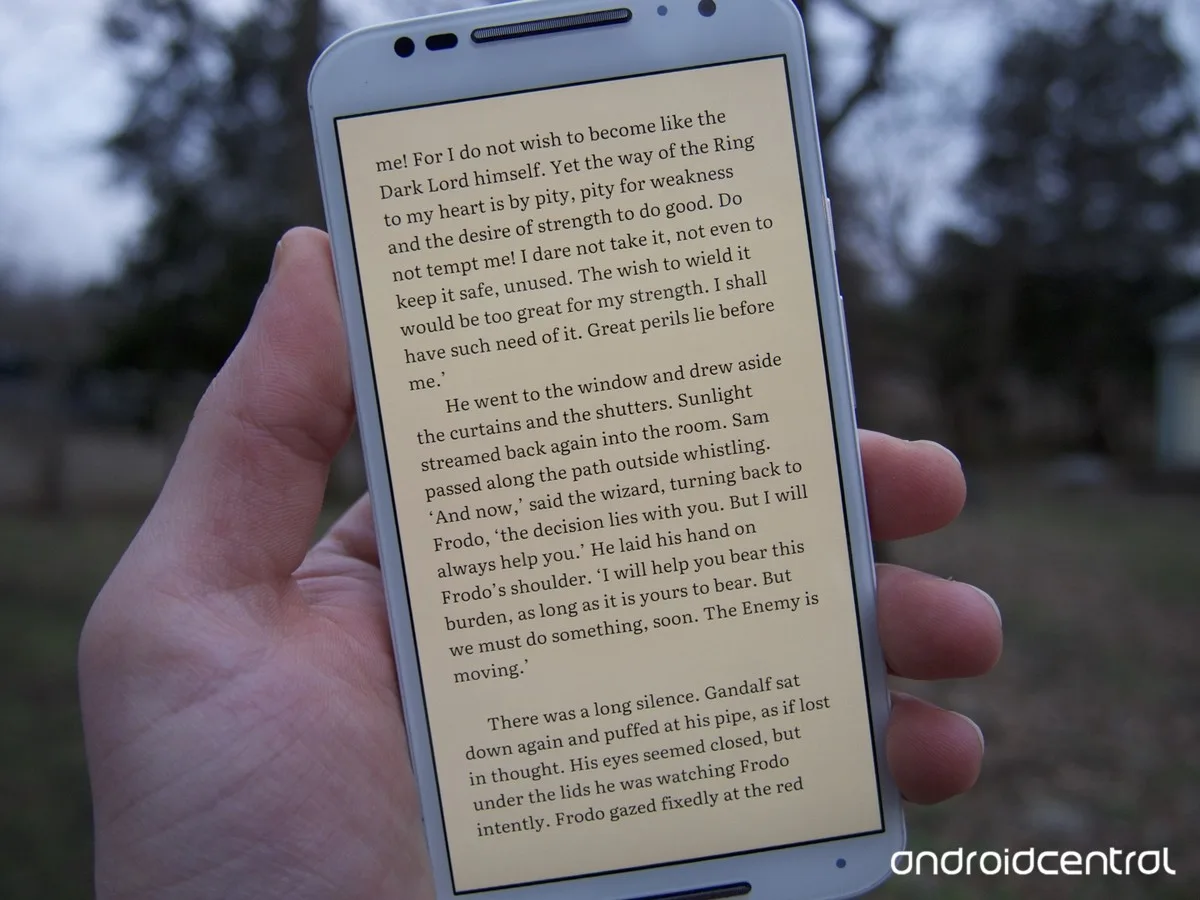
Google Play Books Night Light
Source: androidcentral.com

Amazon’s Kindle has a mode that makes reading at night more pleasant and comfortable for your eyes. If you don’t have a Kindle, the good news is that your Google Play Books has also rolled out a similar mode for their Play Books app!

Called the “Night Light”, the new colour mode gradually filters the amount of blue light displayed by the Play Books app depending on how late it is.

Looking at reading time across the world, activity peaks between 8pm and 10pm local time.

The “Night Light” mode automatically adapts to the amount of natural sunlight outside, using hues of warm, amber light to filter blue light.

By giving the reader just the right temperature and brightness, the colour adjustment greatly improves low-light night reading and therefore reducing eye strain.
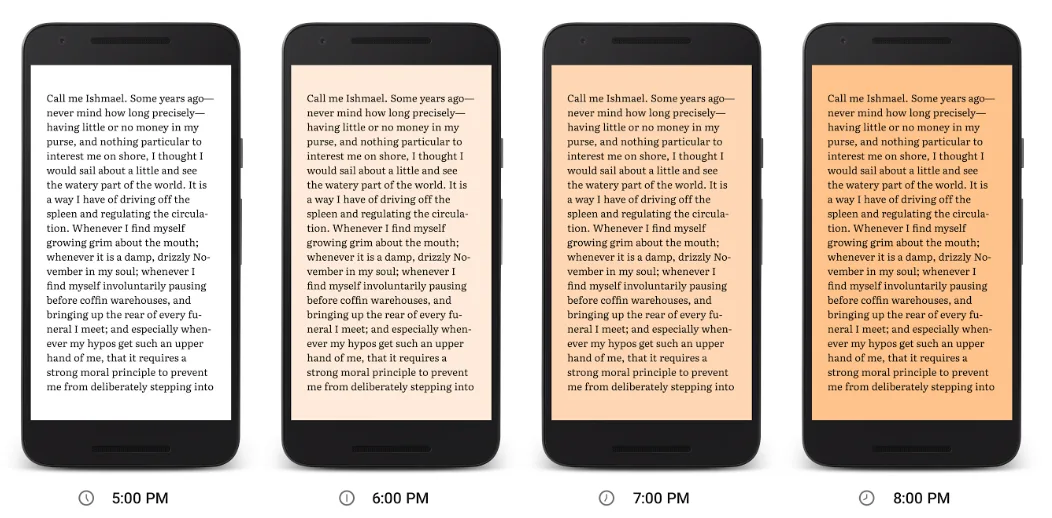
Google Play Books Reading
Source: Official Android Blog

The new feature is still rolling out to Android and iOS readers. To activate it on your phone or tablet, update your Google Play Books app to the latest version through Google Play or the App Store. Then open a book and turn on the Night Light mode option (you’ll see a pop up in the app). After that, Night Light will always adjust to the perfect setting.

Happy reading 😉

Sources: Official Android Blog, The Verge, CNET / Featured image from Android Central.
#GooglePlayGoogle
https://lomp.at/hdwf4
Share3SendTweet2Share

Follow us on Instagram, Facebook or Telegram for more updates and breaking news. 

FOLLOW THE HYPE

Lifestyle News

Malaysia Stands Out As Alternativa Film Festival 2026 Hits Record Submissions

by Dean Zaini
November 28, 2025

Alternativa, the global impact-driven film initiative founded by inDrive, has announced that the 3rd Alternativa Film Festival (AFF) will take...

Read moreDetails
Lifestyle News

Vantive Showcases Life-Saving ICU Innovations At Asia Pacific Medical Conference

by Dean Zaini
November 6, 2025

Global vital organ therapy company Vantive is stepping up its commitment to advancing life-saving treatments for critically ill patients. The...

Read moreDetails
Footwear

Sofía Vergara Joins Skechers As The New Face Of Fashion-Forward Comfort

by Dean Zaini
November 22, 2025

Skechers has announced its newest brand ambassador: globally celebrated actress, entrepreneur, and fashion icon Sofía Vergara. Known for her signature...

Read moreDetails


TOP STORIES TODAY

  1. 1

    HK Legends George Lam & Sally Yeh To Hold Joint Concert In KL In March 2026

  2. 2

    Ameera Khan Dating A Member of The Pahang Royal Family?

  3. 3

    Annalisa Qiqi: 5 Fun Facts About JJ Lin’s Rumoured New Girlfriend

  4. 4

    Everything We Know About “Single’s Inferno” Season 5 So Far

  5. 5

    Apo Nattawin, Bright Vachirawit, & More: Most Stylish Male Thai Stars To Follow

Malaysia’s live-wire for the latest news, trends, and entertainment is finally here. We are your calendar, your grapevine, your comic relief, your post-event coverage, and your celebrity stalker. Did we also mention that we are also your gateway to the world?

Contact us: newsdesk@hype.my

NETWORK

  • Lowyat.NET
  • Murai
  • Hangat
  • Lipstiq
  • Wanista
  • Varnam
  • Moviedash
  • Autofreaks
  • Fourthofficial

ABOUT

  • About
  • Advertise
  • Jobs
  • Terms
  • Privacy Policy

©2025 VIJANDREN RAMADASS. ALL RIGHTS RESERVED.

No Result
View All Result
  • Hype Picks
    • Go
    • Eats
    • Style
    • Streams
    • Concerts
  • Celebs
    • K-pop
  • Music
    • Reviews
    • Interviews & Features
  • Movies & TV
    • Movies
    • TV
    • Features
  • Lifestyle
    • Tech
    • Travels
    • News

©2025 Vijandren Ramadass. All Rights Reserved.

No Result
View All Result
  • Hype Picks
    • Go
    • Eats
    • Style
    • Streams
    • Concerts
  • Celebs
    • K-pop
  • Music
    • Reviews
    • Interviews & Features
  • Movies & TV
    • Movies
    • TV
    • Features
  • Lifestyle
    • Tech
    • Travels
    • News

©2025 Vijandren Ramadass. All Rights Reserved.